
You are here
Troubleshooting
Here you find some hints for troubleshooting.
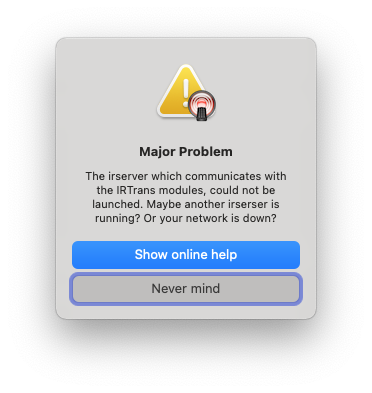
"irserver can not be started"
If you get an alert, that another irserver maybe running, you have to manually quit this second irserver, before iRed will work again.
To force the second irserver to be quit, you may use the command "killall irserver" from a Terminal window.
If you rather like a more "visible" way, please
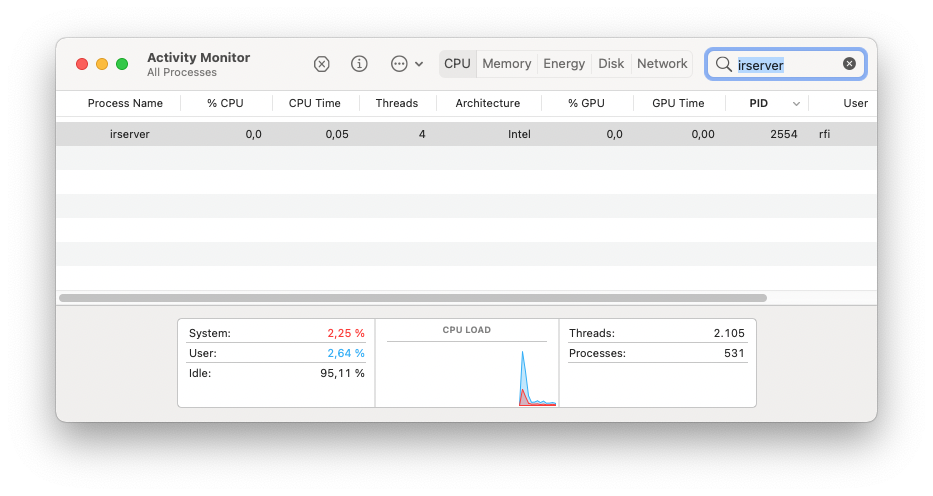
- start the Activity Monitor app,
- enter irserver into the search field,
- select the irserver line
- click the small x button to quit the irserver
After that, restart iRed and it should work as expected.
IRTrans module not learning IR Codes?
If your trials to learn IR codes are not working, i.e. you get error messages, there can be several kinds of problems involved:
- Make sure that the module is started succesfully: after power up or USB cable connect, the module must flash green/red a few times
- USB cable not "good". Sometimes this is the quick solution to learning problems: Try a different cable.
- IR module flashing green without interaction: there may be sources of "IR noise" around, e.g. large TV screens or neon lights. Try different placement or orientation of the module.
- IR module NOT flashing green, when learning codes: for every which code the module "sees", the LED on the module must flash green
- Too close to the module when learning: IRTrans modules with the standard learning receiver learn best at a distance of 1ft up to 10 ft
- Too far away from the module when learning: IRTrans modules with the optional universal learning receiver learn best at about 1 ft.
- IR module does not flash red, when IR code is transmitted: make sure that iRed is connected to the module and you have chosen the right module and LED in iRed's settings
- Learned IR code is not working when testing: try different transmission frequencies when transmitting IR. Not every module can learn the IR frequency, so a standard value of 36 KHz is set by iRed which works with most devices, but not with all
- Learned IR code is still not working with all frequencies: try to learn code in "Raw" mode. This is kind of a last resort
- Settings of LAN modules messed up: visit the configuration page of the LAN module to make sure that IR learner and transmitter are configured correctly.
The following infos are legacy, i.e. only valid for iRed before V2.5
IRTrans USB module not recognized?
The IRTrans USB module needs a driver to be recognized by Mac OS X. Go to the IRTrans USB page to see how to install this driver.
Please refrain from looking for newer drivers on the Internet, because only the provided driver is tested for use with iRed2.
IRTrans USB driver installed correctly?
To check whether the USB driver is installed correctly, please perform the following steps:
- Make sure the IRTrans USB module is connected
- Start System Profiler, either from the "About This Mac" panel, or from "/Applications/Utilities" folder
- Select "Extensions" in the left pane
- Wait for some seconds (takes about 15 secs. on my Mac mini Core Duo)
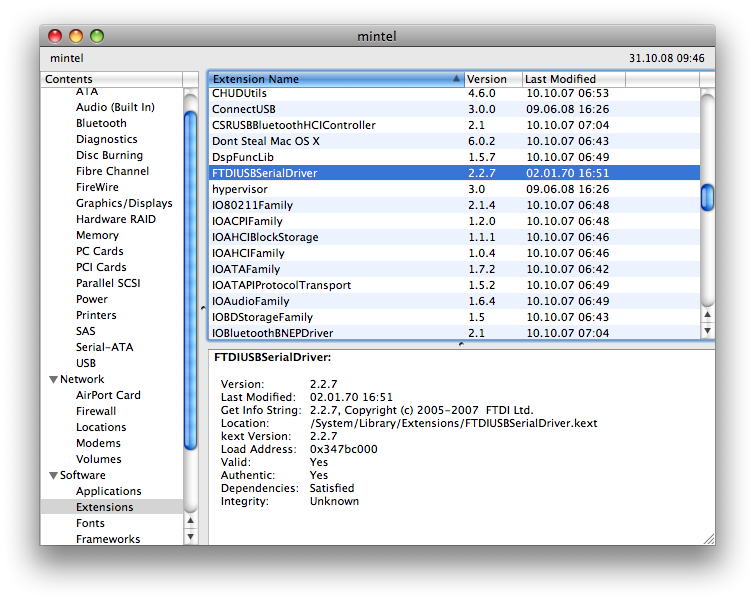
- Scroll the list of extensions down to "FTDIUSBSerialDriver"
- Check the version number listed. It should be 2.2.7, 2.2.14 or later, other versions are not tested nor recommended
- On Sierra, Yosemite, Lion and/or 64-bit systems: The version 2.3 of the driver available from here.
This screenshot of System Profiler shows my configuration and where to find the version number of the installed FTDI-Driver:
Uninstall USB drivers
If you want to uninstall an old or wrong driver, please follow these steps. Administrator rights are required!
- Quit iRed2
- Unplug any IRTrans USB devices (!)
- Open Finder
- Go to folder /System/Library/Extensions
- Look for FTDIUSBSerialDriver.kext
- Move this to the Trash
- Go to /Library/Receipts
- Look for FTDIUSBSerialDriver.pkg and/or FTDIWakeupSupport.pkg
- Remove both, if there
You may restart your Mac afterwards, but it should not be required before installing a new driver.